OVERHEAD Scripts
What community assists claim to do — and the risks before you touch any executor.
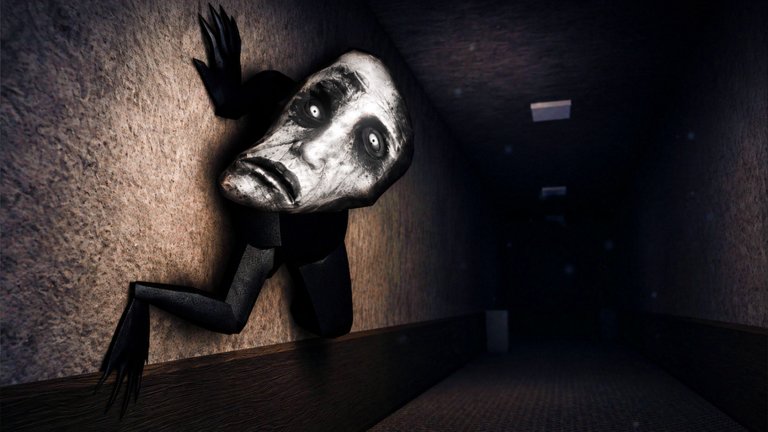
OVERHEAD is a Roblox survival / escape horror game set in a hotel corridor maze. Some players look for scripts that highlight loot and objectives so they spend less time blind-searching drawers while something crawls the walls and ceiling. This hub explains the features people commonly seek, how executor-based scripts are typically used in concept, and why you should treat every third-party tool as a serious account risk.
We do not publish loadstring URLs, pastebins, or download links here. Script hosts change constantly, many bundles include malware, and Roblox ToS forbids unauthorized clients and injectors. If you still research community tools, do it knowing the cost can be a ban, stolen cookie, or worse.
Featured assist type: Item ESP + Objective Assist
Community posts describe a combined helper built around visibility and objective clarity. Typical feature labels include:
| Feature | What players expect |
|---|---|
| Item ESP | On-screen highlights or labels for interactable items such as keys and searchables |
| Objective Assist | Pointers or emphasis toward current goals (for example levers tied to exit steel bars) |
| Search Items | Faster scanning of drawers and containers in the hotel maze |
| Highlight Objectives | Visual priority on what still needs to be completed for escape |
| Visual Indicators | Extra HUD-like cues so you notice threats or targets sooner |
In a game where progress means opening drawers for keys and finding levers that release exit bars, ESP-style overlays are attractive because the layout is intentionally confusing. That does not make them safe or fair. Pure survival skill — listening, locker timing, breath control, and mapping — is what this wiki teaches on How to Hide, Find Keys & Levers, and the Full Walkthrough.
How players typically use executors (conceptual only)
Without naming shady hosts or pasting payloads, the usual pattern looks like this:
- Install a third-party executor (an external program that injects into the Roblox client).
- Join OVERHEAD from the official experience page.
- Attach / inject the executor while the game is running.
- Paste a community script into the executor console and run it.
- Toggle ESP or objective highlights from the script’s UI if it provides one.
Every step outside the official Roblox client is unsupported. Executors are frequently trojanized. “Free” scripts may siphon session tokens. Even “visual only” helpers can trip anti-cheat or report systems. Prefer learning the maze honestly with headphones — the experience is designed around tension, not speedrunning with wallhacks.
Safety disclaimer (read before anything else)
- Account risk: Using exploits or injectors can lead to warnings, bans, or permanent loss of the Roblox account.
- Device risk: Downloaded executors and random script files are a common malware vector. Never run unknown
.exetools as administrator “because a Discord said so.” - No warranty: This wiki does not verify, host, or endorse any script. Feature names above are descriptive only.
- Fair play: ESP and objective assists spoil the analog-horror tension that OVERHEAD aims for — the crawling presence, locker holds, and breath management lose meaning if everything is highlighted.
- Alternatives: Use our Getting Started guide, Survival Tier List, and Players Hub for legitimate advantage through knowledge.
If your goal is simply to finish one escape, a careful Full Walkthrough plus locker discipline will get you further than a risky binary.
When scripts break
OVERHEAD updates (including the known refresh noted around 8 October 2026) can invalidate offsets, object names, and UI hooks that ESP scripts rely on. After any patch, expect community tools to fail until someone rewrites them — another reason not to depend on them. Track changes on the Updates Hub and keep practicing vanilla routes.
Scripts also cannot fix bad habits: sprinting every hallway, ignoring audio cues, opening every drawer in the open while the threat is near, or forgetting to hold breath when it stops outside your locker. Those failures are covered in How to Hide and ranked on the Tier List.
Better uses of your time
| Goal | Legitimate path |
|---|---|
| Learn the loop | Getting Started |
| Escape once cleanly | Full Walkthrough |
| Survive encounters | How to Hide |
| Speed up search | Find Keys & Levers |
| Prioritize skills | Tier List |
| Session setup | Players Hub |
| Official pages | Official Links |
| Reward rumors | Codes Hub (none active) |
Multiplayer note
Servers can hold up to 24 players. ESP that reveals items for you can also disrupt shared exploration for everyone else and paint a target if others report suspicious movement. Co-op works best when teammates call out drawers and levers by voice or chat — see Players for headphones and session tips.
Bottom line
Community chatter around OVERHEAD scripts centers on Item ESP, Objective Assist, Search Items, Highlight Objectives, and Visual Indicators. Knowing those names helps you evaluate what a tool claims to do. Hosting or pasting the actual payload is not this wiki’s job. Play fair when you can; if you still chase executors, accept that the risk is yours alone — and that the hotel’s threat is not the only thing that can end your run.
Frequently Asked Questions
Quick answers for surviving OVERHEAD’s hotel maze.
Does this wiki give OVERHEAD script loadstrings?
No. We describe common feature names only. We do not publish loadstring URLs, downloads, or executor recommendations.
What do Item ESP and Objective Assist usually do?
Item ESP highlights loot or searchables; Objective Assist emphasizes goals such as levers or exit-related objects. Both are third-party overlays and are not part of the official game.
Can I get banned for using scripts in OVERHEAD?
Yes. Unauthorized executors and exploits violate Roblox rules and can result in account penalties. Use them at your own risk.
Will scripts keep working after updates?
Often not. Patches can break ESP and objective helpers until they are rewritten. Prefer learning vanilla routes from our guides.
What should I use instead of ESP?
Follow Getting Started, Find Keys & Levers, How to Hide, and the Full Walkthrough. Headphones and a calm search route beat risky overlays.