OVERHEAD Controls & Audio Setup
Bindings, headphones, and device habits that keep you alive in the corridors.
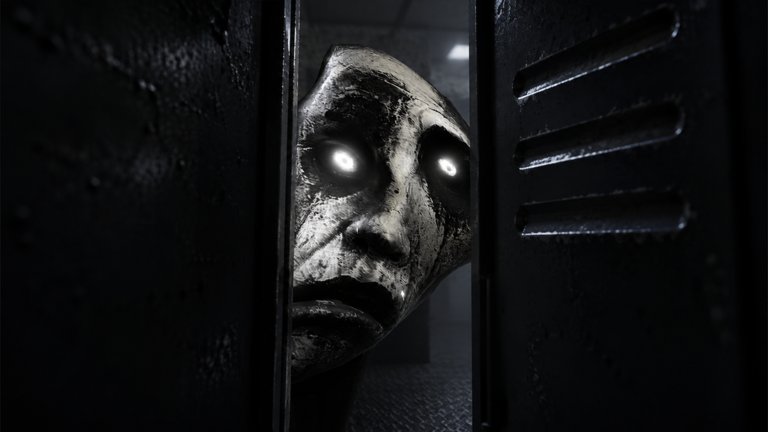
OVERHEAD [HORROR] uses familiar Roblox movement, but the win condition is audio-aware play inside a hotel maze. This page documents the practical control and setup habits that matter: how you move, how you interact with drawers and levers, how you commit to lockers, and how you configure sound before the crawler teaches you the hard way. Pair it with Players for session size advice and Getting Started for the full beginner loop.
Official join link: OVERHEAD on Roblox by Escape The Monster Games. Voice chat is not supported in the experience — coordinate with friends via text chat or an external call.
Core actions you will use every run
| Action | Typical Roblox mapping | OVERHEAD use |
|---|---|---|
| Move | WASD / left stick | Corridor routing; prefer walk while learning |
| Look | Mouse / right stick | Ceiling checks matter — the threat crawls overhead |
| Sprint | Shift / click stick (device dependent) | Escape bursts only; not a default lifestyle |
| Interact / prompt | E / tap prompt | Drawers, keys, levers, lockers, exit interactions |
| Jump | Space / face button | Rarely useful; avoid noisy panic jumps |
| Struggle / break free | On-screen prompt when caught | Full focus — see When Caught |
| Hold breath | Context prompt when hiding | Critical if the threat stops outside your locker |
Exact key labels can vary by platform (PC, mobile, console) and your Roblox settings. Open Roblox Settings → Controls if a prompt feels wrong, then return to the hotel. Do not invent custom console commands; OVERHEAD is not a debug sandbox.
Audio setup (non-negotiable)
- Wired or reliable wireless headphones — spatial footsteps that are not on the floor are the whole point of the fantasy.
- Game volume audible, music ducked — if you run Spotify louder than Roblox, you will die to a crawl you never heard.
- Disable noisy overlays — Discord deafen hotkeys, party coughs, and mechanical keyboard ASMR all mask ceiling scrapes.
- Test for ten seconds at spawn — turn in place, confirm left/right imaging works, then start searching.
Players who skip headphones treat OVERHEAD like a visual maze and lose. Rank listening at the top of the Survival Tier List.
PC habits that raise survival rate
- Lower mouse sensitivity slightly so ceiling pans stay controlled.
- Keep the interact key comfortable; you will spam drawers under stress.
- Fullscreen or borderless with stable FPS beats a tiny window with chat popups.
- Close browser autoplay tabs before a serious clear attempt.
Mobile and controller notes
Mobile touch prompts work, but fine camera control during locker peeks is harder. If you struggle:
- Increase touch camera sensitivity carefully until you can check ceilings without spinning out.
- Practice one locker enter / exit drill in a quiet wing before deep loot routes.
- Prefer quieter public hours or private friend servers when learning.
Controller players should confirm which face button confirms prompts and which stick click sprints. Mis-mapped sprint is a common cause of noisy deaths.
Interact discipline
Opening every drawer the moment you see it is how you get caught mid-animation. Control tips for objectives:
- Clear a short segment, then pause and listen (Find Keys & Levers).
- Face the interactable squarely so prompts do not fail under panic.
- After a lever, take one second to confirm world feedback before sprinting away.
- Near the exit bars, slow inputs — see Escape & Ending.
Hide and breath inputs under stress
When proximity spikes:
- Stop sprinting toward loot.
- Path to a pre-spotted locker.
- Confirm enter animation finished.
- If it stops outside, execute hold breath immediately.
- Leave only when audio cools.
Full technique: How to Hide. Controls knowledge without hide timing still fails runs.
Accessibility and comfort
OVERHEAD carries mild fear and violence maturity labels on Roblox. Use headphones at a volume you can sustain — damaging your hearing helps nobody. Take breaks after intense grabs. If flashing lights or loud stingers bother you, lower master volume and play with a friend who can call threats.
What not to bind your hopes to
- Promo codes do not remap controls (Codes — none active).
- Executor “assist” UIs are account risks (Scripts).
- After patches (including 8 October 2026), retest prompts and audio mix (Updates).
Quick pre-flight (60 seconds)
- Headphones on, game audio verified.
- Confirm move / look / interact / sprint feel normal.
- Join official OVERHEAD (experience ID 114913117178927).
- Spot two lockers near spawn.
- Open Getting Started checklist if this is life one.
Good controls are invisible. Bad setup is loud. Configure once, then let the hotel teach routing — not keyboard regret.
Frequently Asked Questions
Quick answers for surviving OVERHEAD’s hotel maze.
What controls do I need for OVERHEAD?
Standard Roblox move, look, sprint, and interact, plus context prompts for lockers, hold breath, and struggle when caught. Check Roblox Settings → Controls per device.
Do I really need headphones?
Yes for serious clears. The threat uses walls and ceiling; spatial audio is the primary warning system.
Does OVERHEAD support voice chat?
No. Voice chat is not supported. Use text chat or an external call with friends.
Can I play on mobile?
Yes, but practice camera and prompt timing. Many players learn faster on PC with headphones first.
Where do I learn hide and struggle inputs?
See How to Hide for locker and breath holds, and When Caught for break-free priorities.